Parallel-Draft — compare two PDF drawings and box the changes
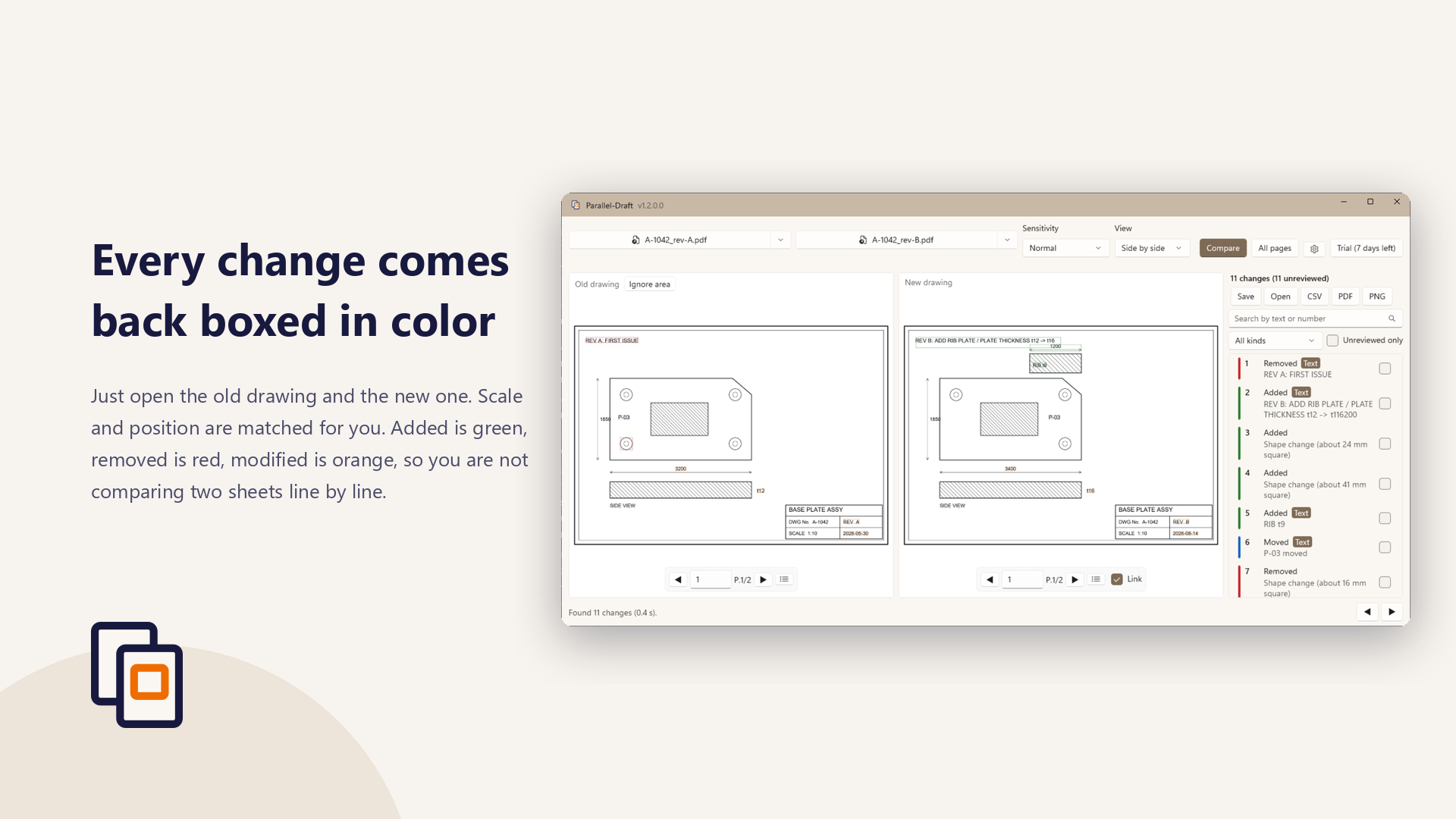
A revised drawing arrives, and the question is always the same: what changed since the last revision? Parallel-Draft takes that pass off your hands. Open the old and the new PDF, and every change is boxed in color. No CAD application and no source files are needed. Drawings are processed entirely on your own PC and are never sent anywhere.
Get it from the Microsoft Store
When you would reach for it
- A revision just arrived and the change log you were given does not say where it landed
- Checking a drawing and you do not want a small change to slip past you
- Reconciling a client’s drawing against your own, with nothing but PDFs on hand
- Recording what changed, as an annotated PDF or a list you can hand to someone else
Pricing
Parallel-Draft is free to download. The features under “What it does” are included at no charge. The features under “What Pro adds” require the Parallel-Draft Pro in-app add-on (one-time purchase, ¥8,000). They can be tried for 7 days after installation; after that they require the purchase.
What it does
- Opens two PDFs and lines them up automatically, matching scale and position
- Boxes each change in color (added = green, removed = red, modified = orange)
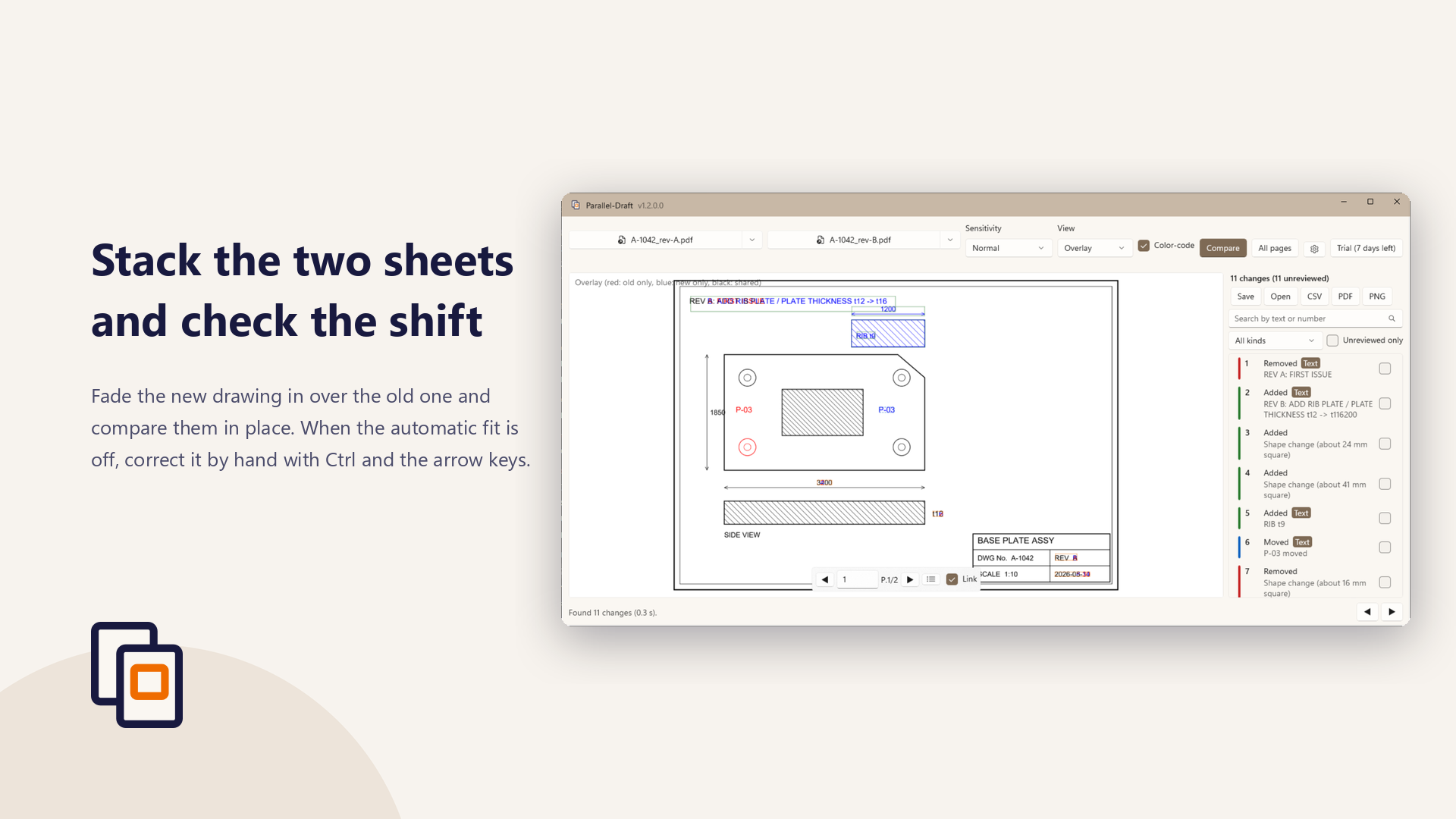
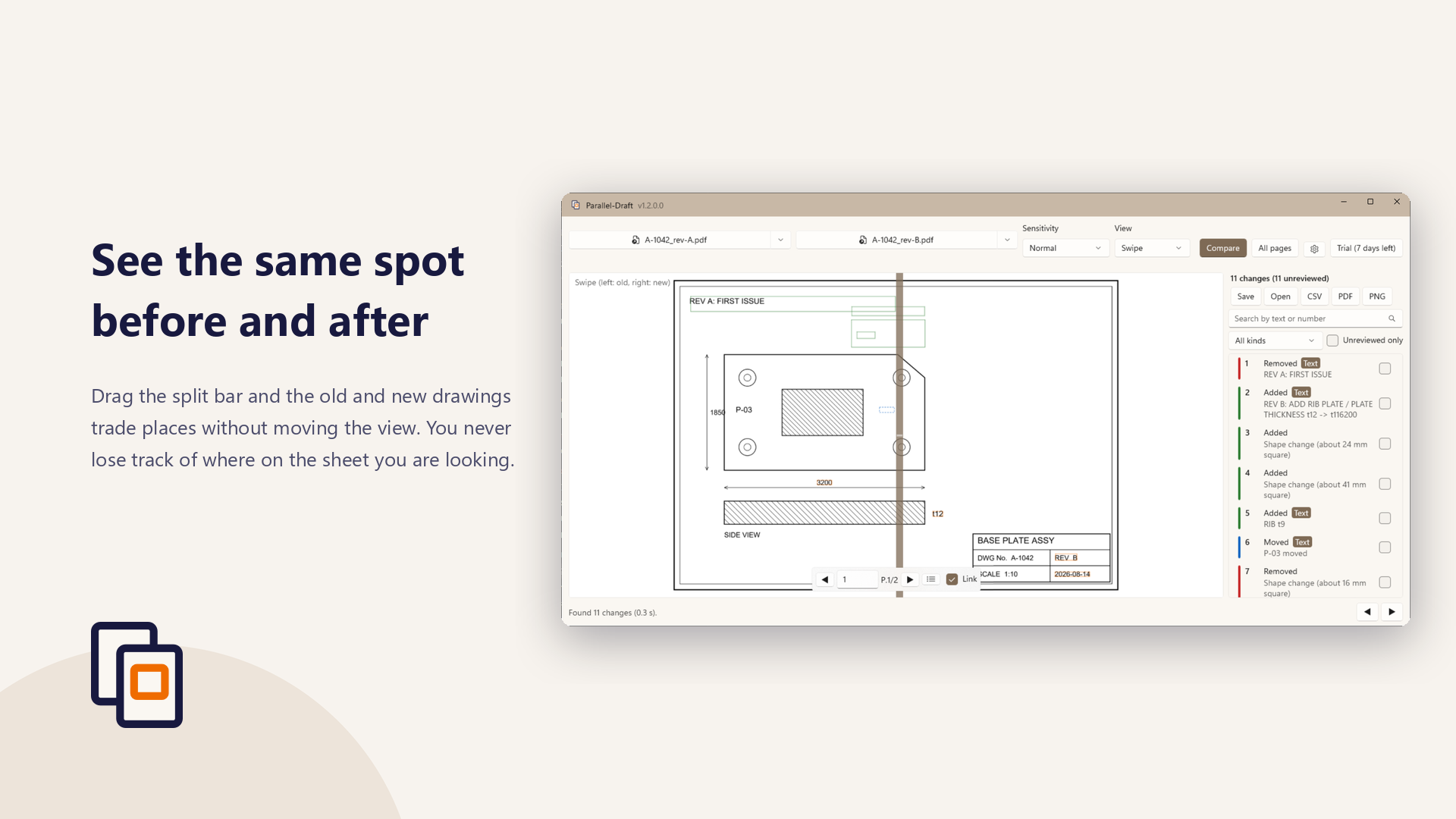
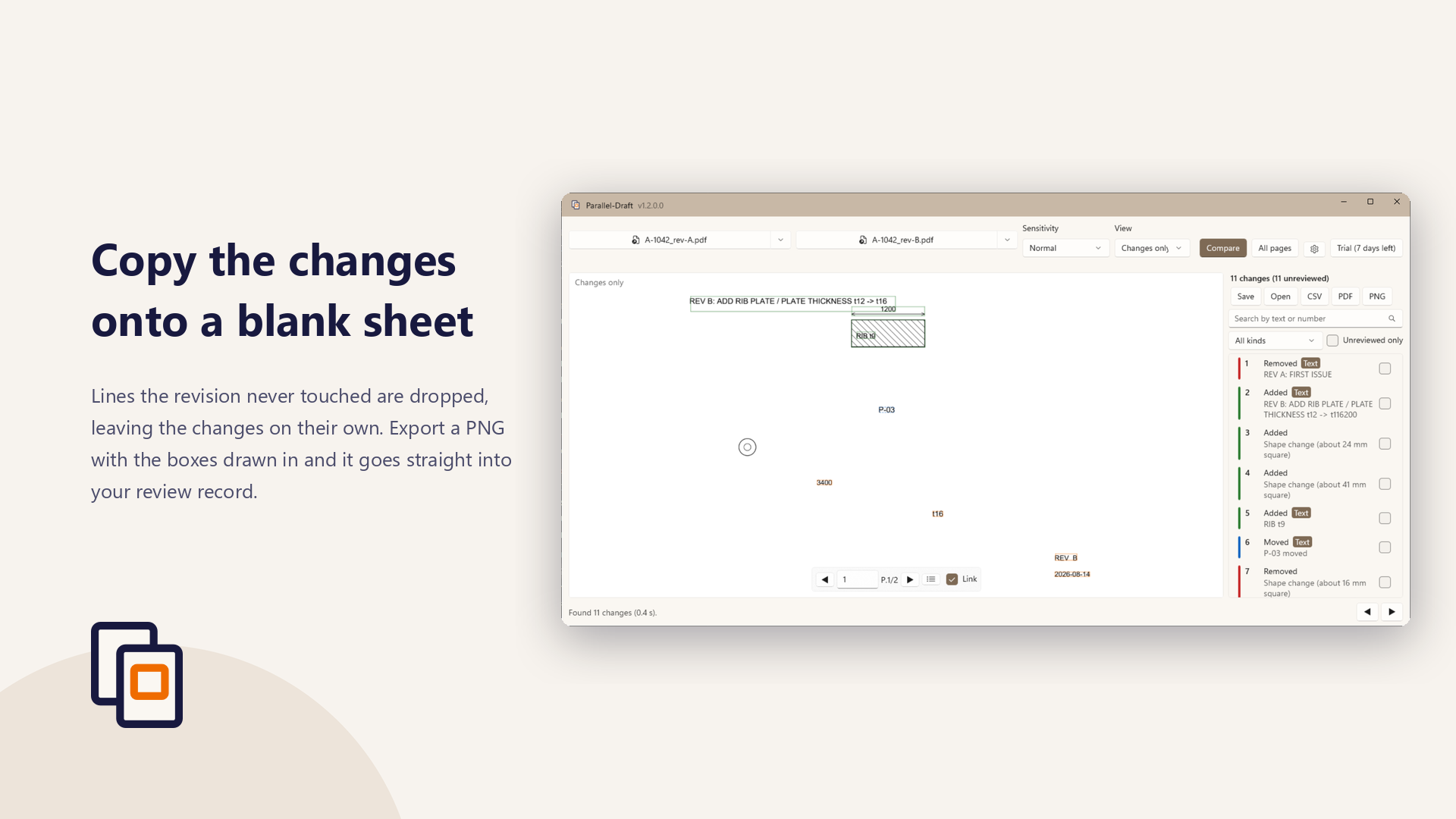
- Four view modes — side by side, overlay, swipe, and changes only
- Compare any two pages, even when the drawings have different page counts
- Three sensitivity presets
- Export the current page as a PNG with the boxes drawn in
- Correct the alignment by hand with
Ctrl + arrow keyswhen the automatic fit is off - Tell the change kinds apart without relying on color (they differ by line style too)
- A0 and A1 sheets stay responsive: only the part you are looking at is drawn
What Pro adds
For 7 days after installation you can also try:
- Text differences inside the drawing — a dimension change shown as “3200 → 3400”
- The change list — click to jump to a change, filter, search, and tick off what you reviewed
- CSV export of the change list
- Annotated PDF export (colored boxes, numbers, and a summary page)
- Compare every page at once, with pages matched by drawing number
- Saved review records (
.pdiff) you can reopen and continue - Ignore areas, so a title block does not show up as a change every time
- Detection of changes in line weight or color alone
- A shape that moved without changing is shown as one moved change
- Scanned drawings tilted by up to a few degrees are straightened automatically before comparing
- Text in scanned drawings is read with OCR, so dimension changes show up there too
After 7 days those features stop. To keep using them, buy “Parallel-Draft Pro” from inside the app. It is a one-time purchase (¥8,000), not a subscription, so there are no further charges and no expiry. The same Microsoft account does not have to buy it again on another PC.
Saved review records (.pdiff) can still be opened and read after the 7 days are up.
What it cannot detect
Comparing drawings is not infallible. The following changes are known in advance to be undetectable, or hard to detect, with the default settings.
- A change in line weight alone, when the difference is about 2–3 px or less
- A change in color alone (the comparison converts to black and white first)
- Small text changes (text below roughly 30 px on screen, which is where real dimension values land) — Pro’s text comparison does find these
- A solid line changed to a dashed line (the gaps show up as “removed”)
- A change in hatch density (the whole area tends to come out as one change)
- Differences in PDF layers (shown or hidden)
Please do not let this app be the last check in your review. It is built to make a missed change less likely, not to remove the need to look.
Your drawings stay on your PC
Neither the drawings you open nor the comparison results are sent anywhere. No usage data is collected. The only time this app reaches the network is to verify your Microsoft Store license. Crash records stay on your PC and are never transmitted.
The privacy policy has the details (Japanese).
System requirements
- Windows 10 version 1809 (10.0.17763) or later
- 64-bit (x64). Runs on ARM64 PCs as well
- PDF drawings (text in a scanned image-only drawing is read with the Pro OCR, which needs Windows text recognition for English or Japanese)
- The interface is available in Japanese and English, following your Windows display language
Frequently asked questions
Is it free?
Parallel-Draft is free to download, and comparing two PDFs, the colored boxes, and PNG export are included at no charge. Text differences, the change list, CSV and annotated PDF export, and all-page comparison require the “Parallel-Draft Pro” in-app add-on (one-time purchase, ¥8,000). They can be tried for 7 days after installation.
Do I need the CAD files (DWG / DXF)?
No. The comparison works from the PDFs alone. You need neither a CAD application nor access to the source data, so drawings a client sent you as PDFs can be compared as they are.
Does it work on scanned drawings?
Shape differences are detected. With Pro, the text in an image-only PDF is read with the Windows text recognition (OCR), so dimension changes are reported as numbers too. The reading happens on your PC and nothing is uploaded. OCR can misread characters, so changes read this way carry an “OCR” mark.
Are my drawings ever uploaded?
No. The drawings you open and the comparison results stay on your PC. No usage data is collected. The only time the app reaches the network is to verify your Microsoft Store license.
Can it compare drawings with different page counts or sheet sizes?
Yes. Scale and position are matched automatically. When the page counts differ you can pick any two pages, and Pro matches pages by drawing number to compare every page at once.
Is it a subscription? Can I use it on another PC?
It is not a subscription. Pro is a one-time purchase (¥8,000) with no further charges and no expiry. The same Microsoft account does not have to buy it again on another PC.
Is the source code available?
No. The GitHub repository holds only this page and the privacy policy. Bug reports and requests are welcome in Issues.