Parallel Factory MES
Manufacturing execution system (MES)AGPL-3.0.NET 10 / Blazor

From manufacturing order to shipment, every record linked by lot.

Parallel Factory MES is an open-source MES for recording and tracing factory production in the browser. It treats orders, work, inventory, inspection and shipping as one continuous flow, so you can always trace in both directions which material lots went into which product lots.

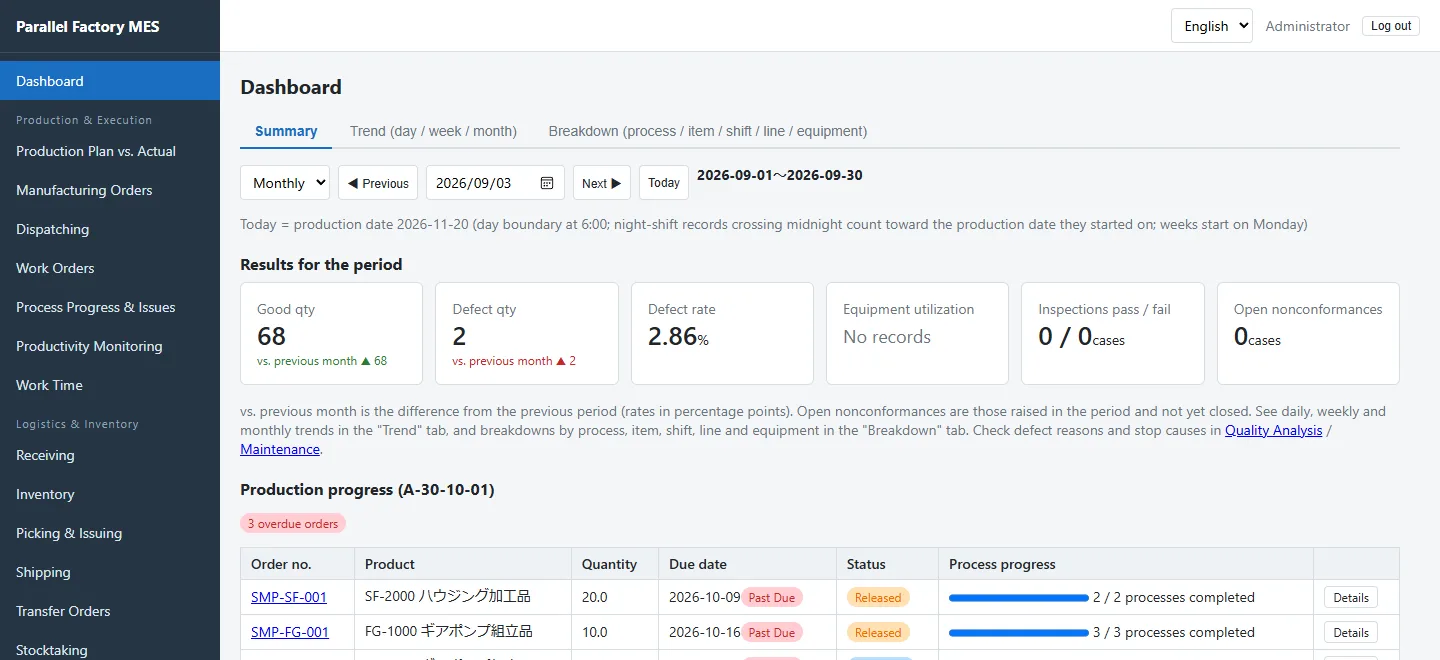
DashboardMonthly · September 2026
Dashboard screen showing the monthly summary for September 2026: 68 good, 2 defects, a 2.86% defect rate, and the process progress of the manufacturing orders

A factory's whole day, in one set of screens

Records that each department used to keep in separate spreadsheets are linked by the same lot number. A process cannot start before the previous one is finished, and nothing ships until inspection has passed: the system keeps the order of the work.

  1. Master dataProducts, routings, equipment
  2. ReceivingRecord material lots
  3. OrderRegister and approve
  4. ReleaseWork orders and output lots
  5. DispatchingAssign operators and equipment
  6. SetupChecklists
  7. Record resultsGood, defects, consumption
  8. Completion approvalClose the process
  9. InspectionMeasurements judged automatically
  10. Shipment judgmentApproved, on hold, special acceptance
  11. ShippingOnly judged lots can ship
Production management Shop floor Quality Logistics / warehouse
A-20-10-01B-10-20

Register an order, and work orders line up for each process

When you approve a manufacturing order and release it, work orders are created following the routing registered for the product, and the output lot is numbered automatically. Each status has its own color, and no step can be skipped.

Draft→Approved→Released→Completed
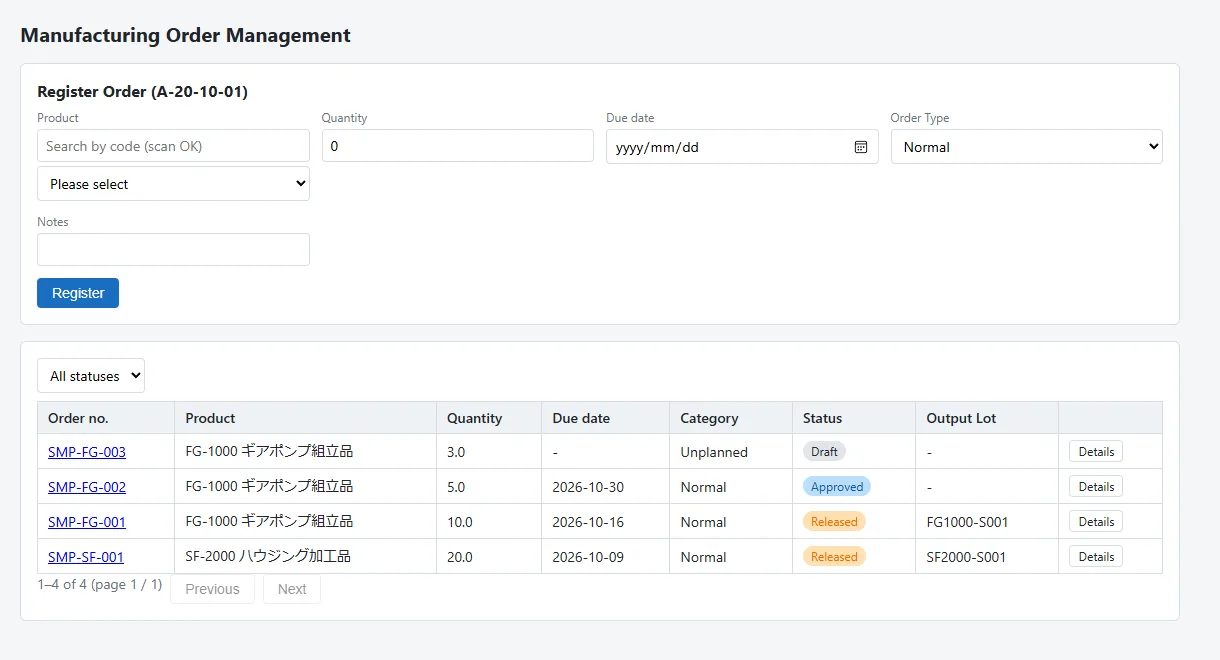
Manufacturing Order ManagementSMP-FG-001 and others
Manufacturing Order Management screen with the order registration form and a list of four manufacturing orders (category, status, output lot)
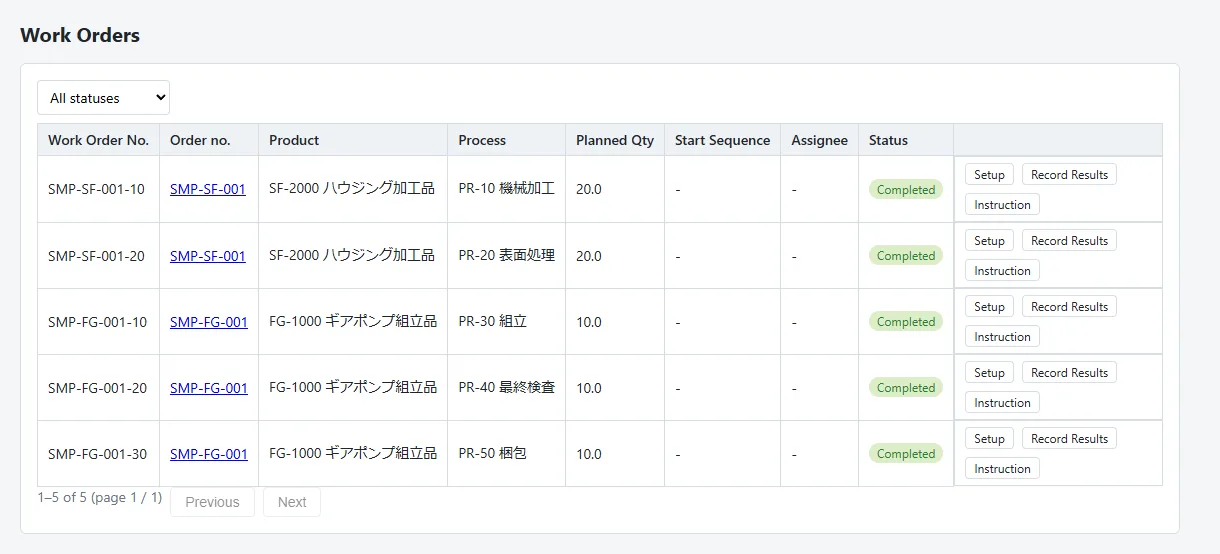
Work Ordersorder no.-sequence
Work order list with five work orders, one per process, and Setup, Record Results and Instruction buttons
BarcodeQR

Paper work instructions and lot tags, printed straight for the floor

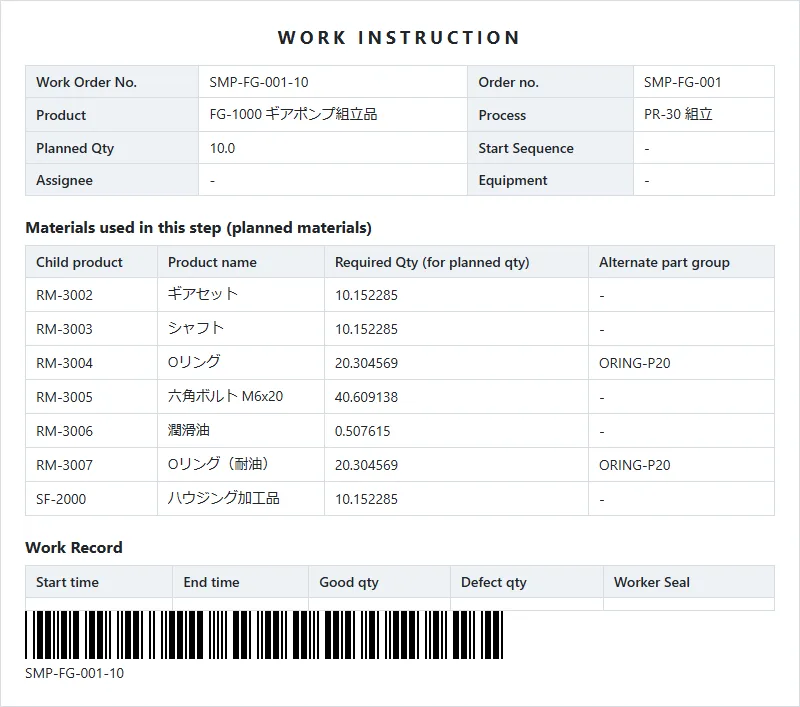
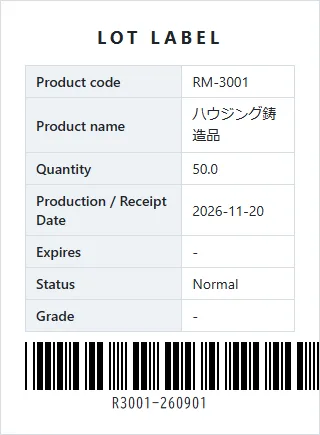
A work instruction lists the parts used in that process with their required quantities, a recording area and a barcode. You can also issue a lot tag for each lot, and save either as PDF.

  • Scan with a USB barcode reader or a tablet's camera
  • Every lot number and work order number field accepts scans
Work instructionPrint / PDF
Print preview of a work instruction: work order number, product and process, a table of the materials used in this step (planned materials), the work record area, and a barcode of the work order number
Lot tag
Lot tag showing the product code, product name, quantity, production / receipt date and a barcode of the lot number
H-30-10-01-02

Which lots went into this product?

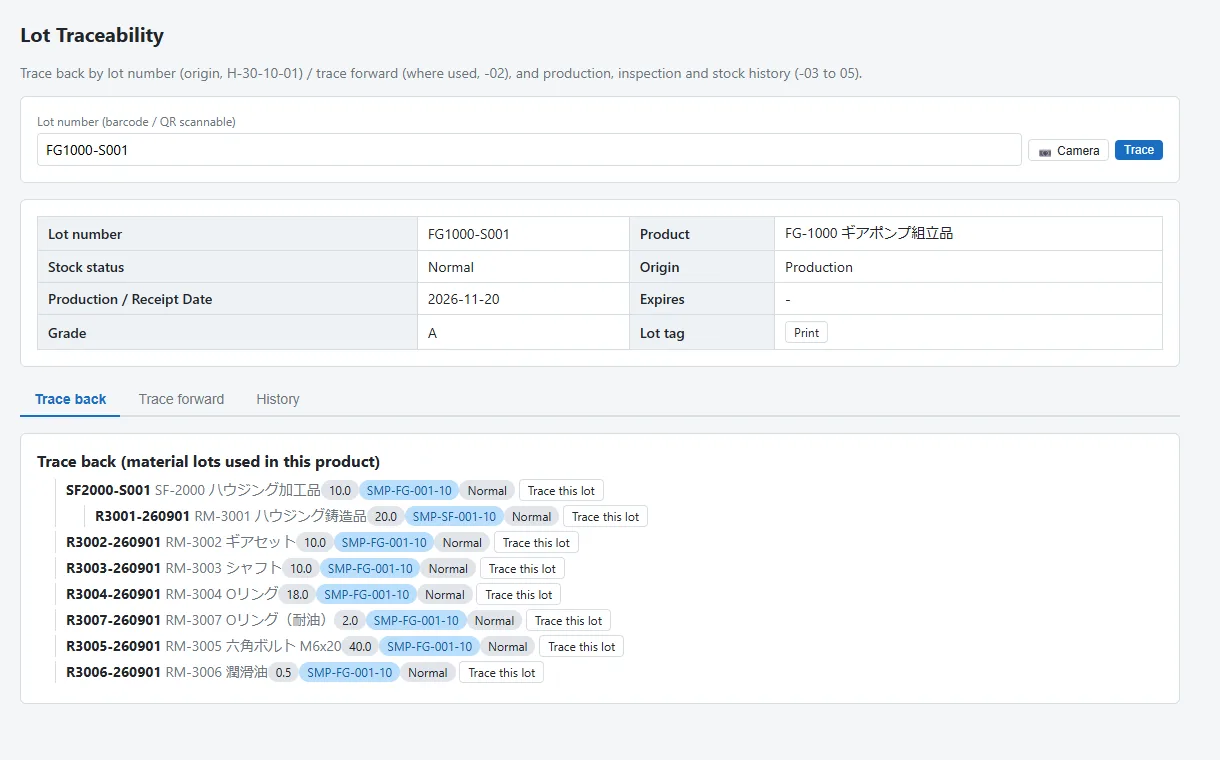
Just scan a product lot number to follow the semi-finished and material lots it used all the way down (trace back). In the other direction, you can find every product that used a given material lot (trace forward).

  • Each lot shows which work order consumed it
  • "Trace this lot" takes you straight to the next level
  • Production, inspection and stock movement history on the same screen
Lot TraceabilityFG1000-S001
Traceability screen showing the trace back of product lot FG1000-S001: the semi-finished lot SF2000-S001 and seven material lots, including the casting lot under it, in a tree
D-10-30-01D-10-30

Inventory is held by lot × location

Stock moves with every receipt, production and shipment, and the movement history is kept. Location moves, quantity adjustments, splits and merges, holds and scrapping are all recorded with a reason.

  • Expiry alerts for lots close to their expiry date
  • Lots on hold or nonconforming are stopped at issuing and consumption
  • Screens for stocktaking, transfer orders, and picking & issuing too
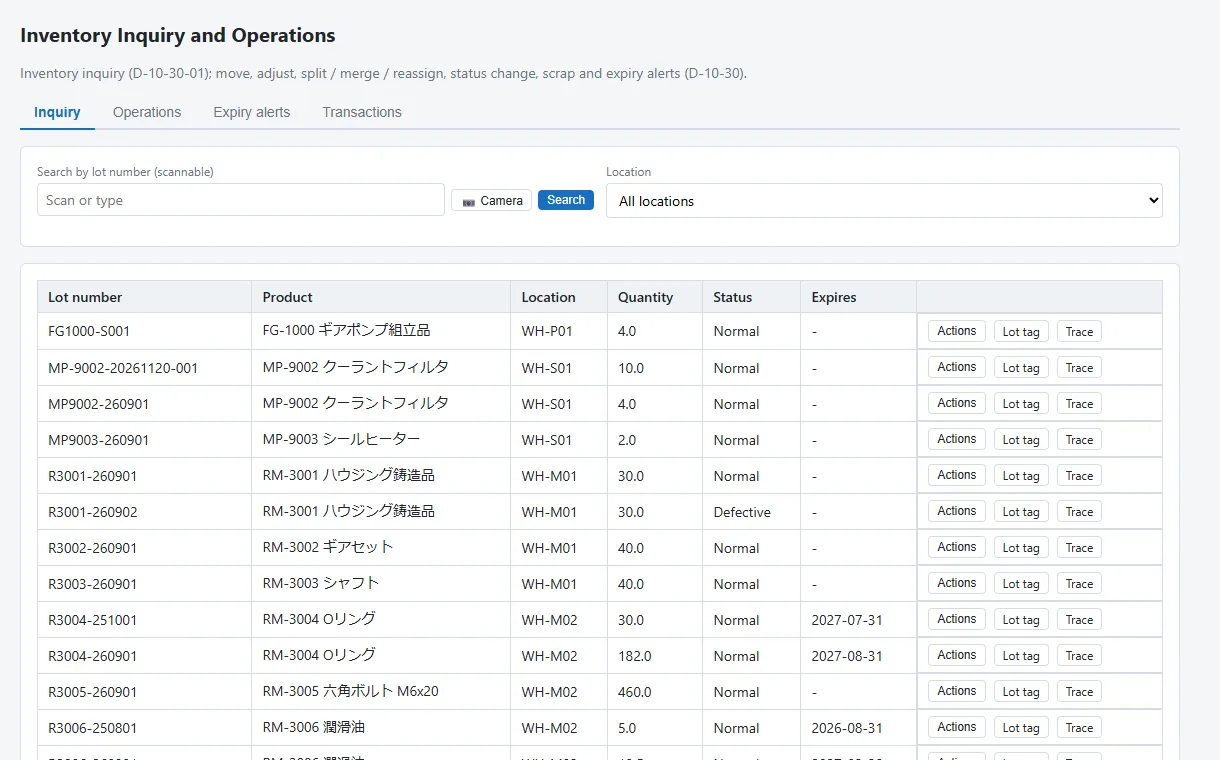
Inventory15 lots
Inventory inquiry screen listing lot number, product, location, quantity, status and expiry, with Actions, Lot tag and Trace buttons
B-60-10-05C-40-10-03

Figures close by production date

First-pass rate, yield and defect rate are totaled by product, by process and by shift. Even when a night shift runs past midnight, results up to the boundary time (6:00 a.m. by default) fall on the same production date.

Production date September 21 The hatched area is the night shift from 21:00. Even after the date changes, results up to 6:00 the next morning count toward the production date of the 21st. The boundary time can be changed in the settings.
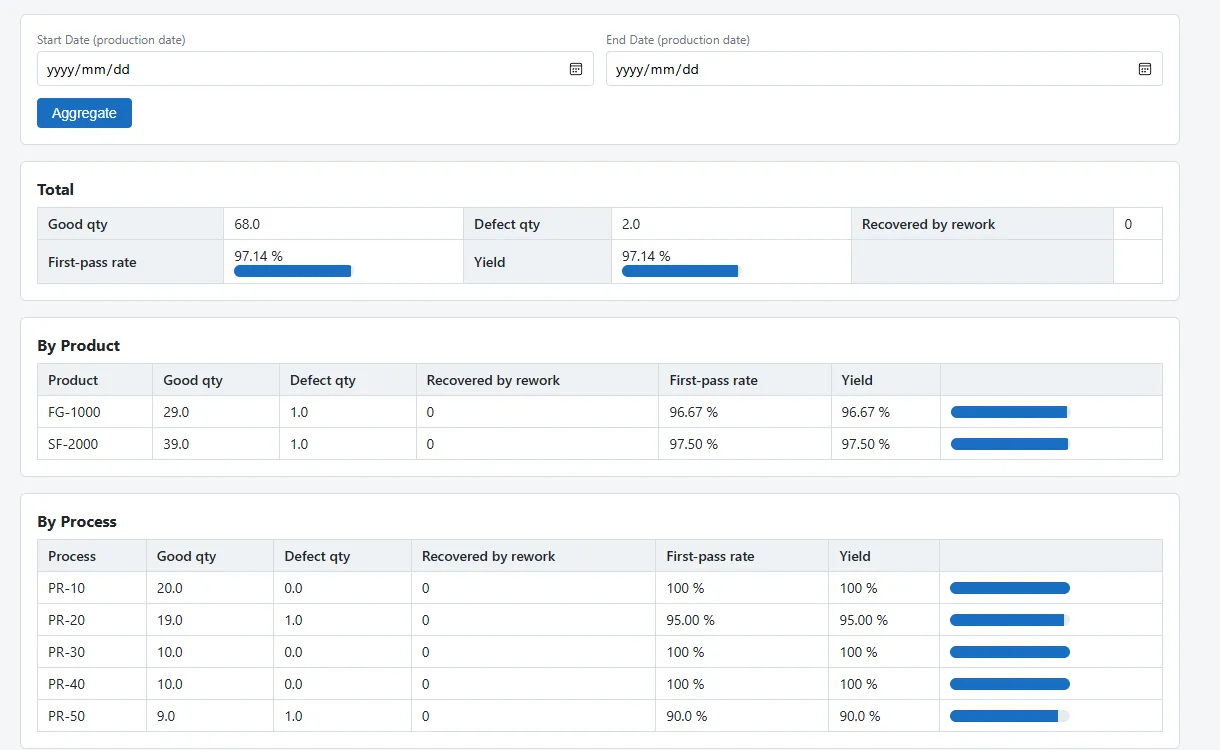
Productivity MonitoringFirst-pass rate 97.14 %
Productivity Monitoring screen with the total good quantity, defect quantity, first-pass rate and yield, and tables by product and by process
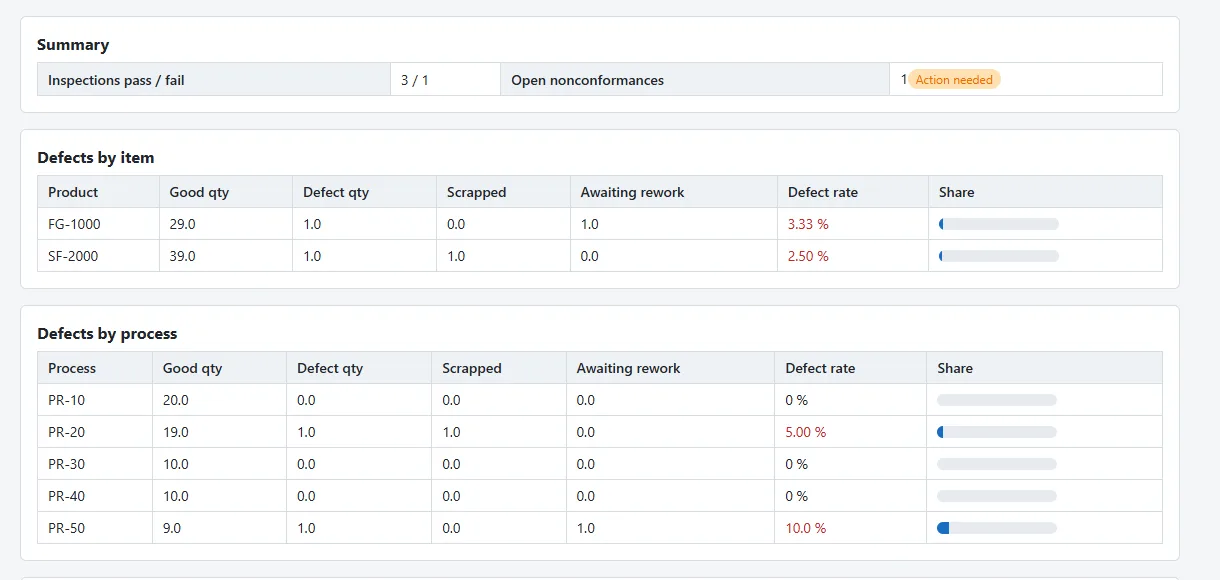
Quality AnalysisDefects by process
Quality Analysis screen with defects totaled by item and by process, including scrapped, awaiting rework and defect rate
Audit log

Who changed what, and when

Correcting results or inspection results, changing master data, inventory operations, cancellations: every operation that changes a record is kept in the audit log, and corrections also store the values before and after.

  • The log itself cannot be edited or deleted
  • Even purging entries past the retention period is itself recorded
  • Permissions are per role: viewing stays open, and only write operations are restricted
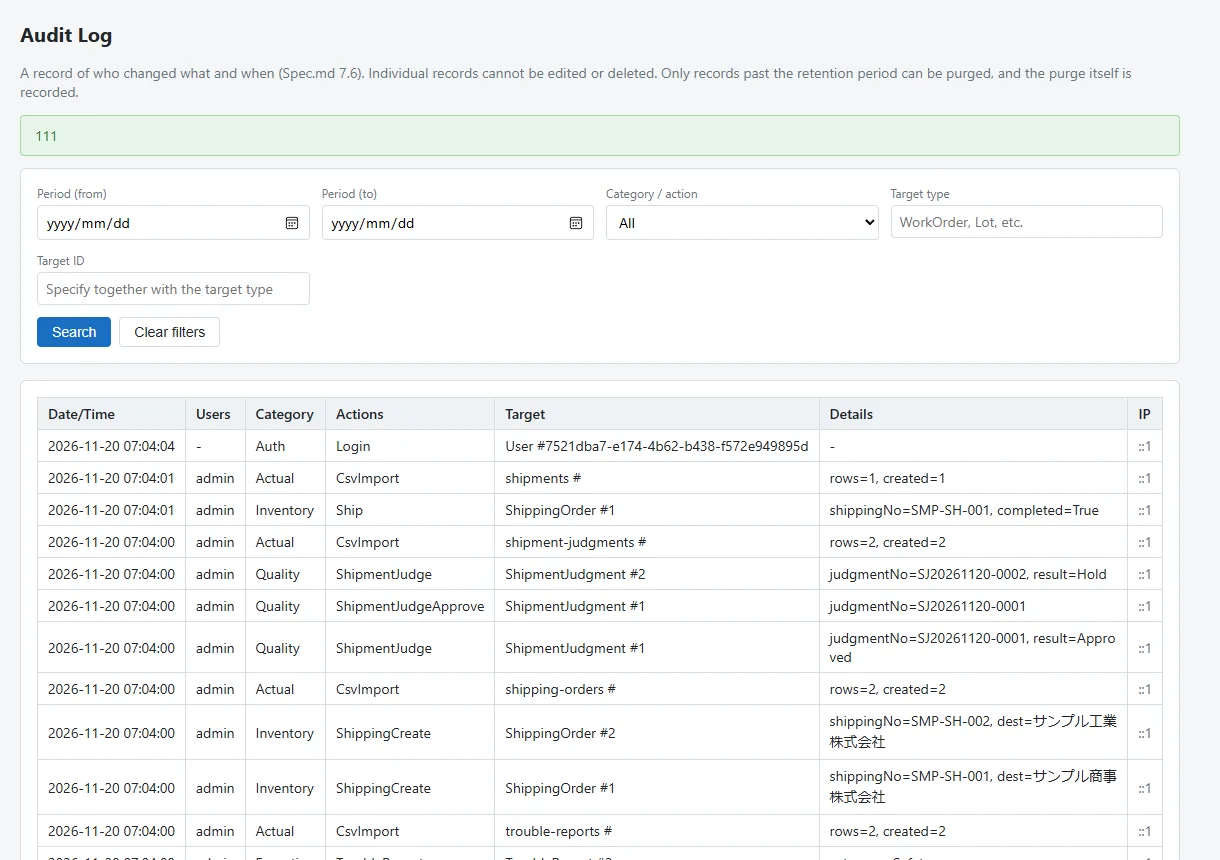
Audit LogSystem administrator
Audit Log screen listing date/time, user, category, action, target and details
CSVZIP

Get started by loading CSV in bulk

Master data such as products, routings, equipment and inspection items can be imported and exported as CSV. Bundle the files in a ZIP to import them all at once; if even one row has an error, the whole import is rolled back. You can check first with "Validate only".

  • UTF-8 and Shift_JIS are detected automatically
  • Actual records such as receipts, production results and inspections can also be imported from CSV (for testing, migration and training)
  • Comes with a complete set of sample data ready to import. The screens on this page were made with it
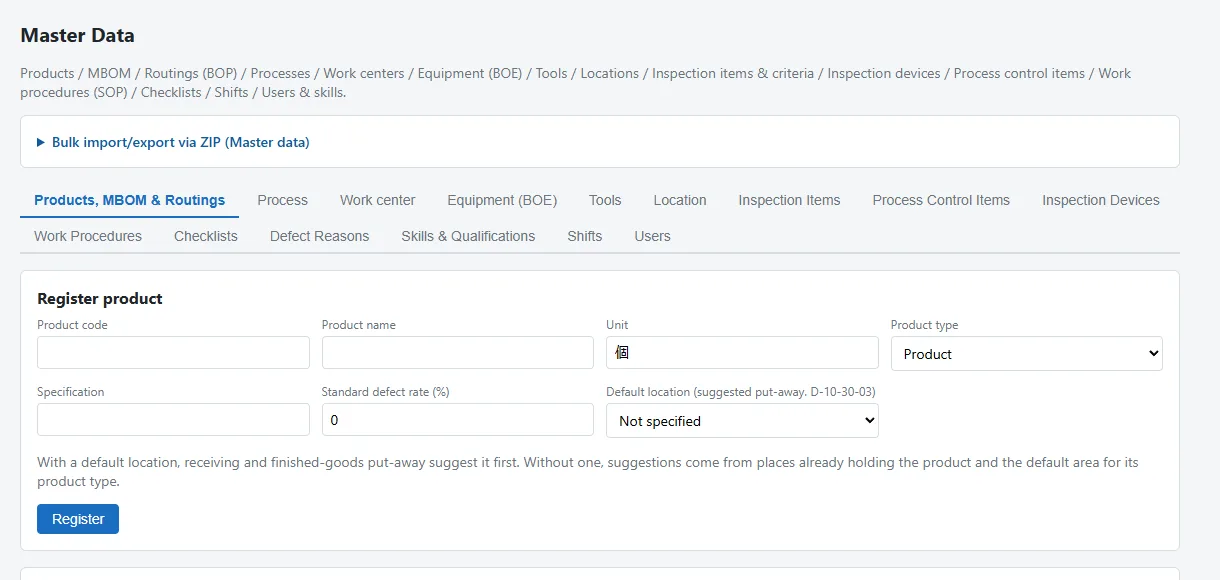
Master Data15 tabs
Master Data screen with tabs such as Products, MBOM & Routings, Process, Work center and Equipment, the product registration form, and the ZIP bulk import/export panel
Integration APIWebhooks

Connect other systems
with CSV, an API and notifications

CSV files exported by sales or production planning software are imported just by placing them in a chosen folder. Programs can import and export through the integration API with an API key. Events in the MES are sent to the URLs you register as Webhooks.

  • Comes with an OpenAPI specification. Sending again does not register twice
  • Production results can be read from where you left off
  • Notifies results, status changes, nonconformances and equipment stops, and retries automatically when delivery fails
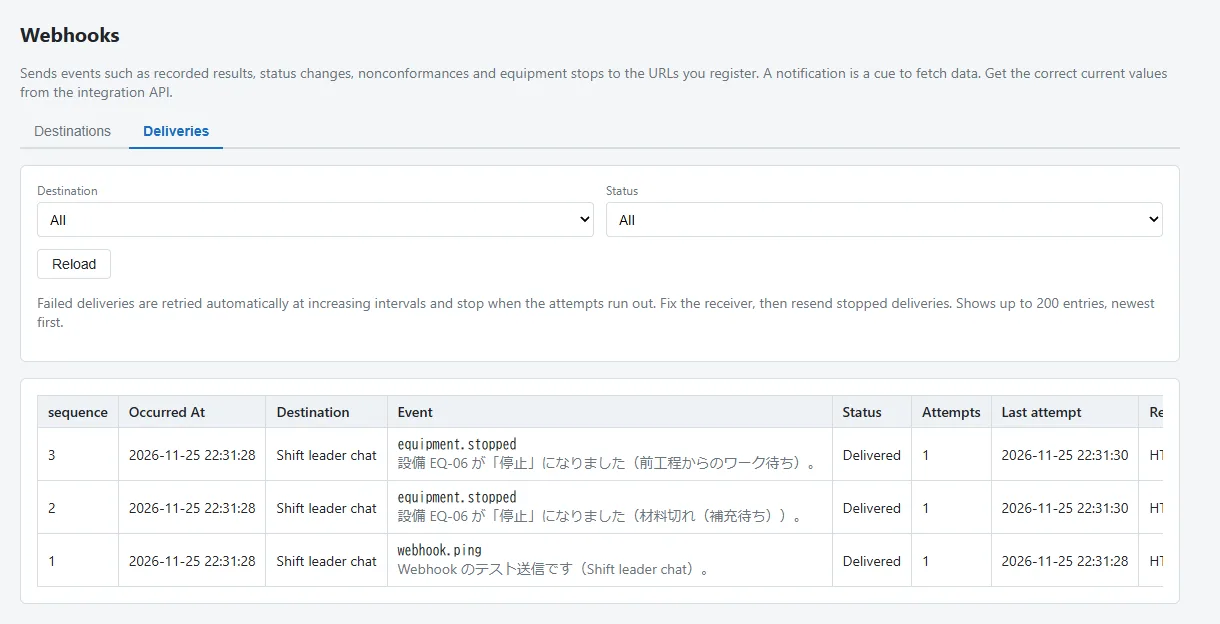
WebhooksDeliveries
Deliveries tab of the Webhooks screen, listing an equipment stop notification and a test notification delivered to the destination
E-20-10-03Equipment events

See the current status
of your equipment

A gateway (such as Node-RED) reads the PLC status and sends each change to the MES. The MES assembles the changes into running, stopped and setup periods, and looks up the stop cause from the alarm code.

  • A notice appears when no events arrive from a piece of equipment
  • Stops whose cause could not be looked up can be filled in later
  • Manually recorded and automatically collected equipment on the same screen
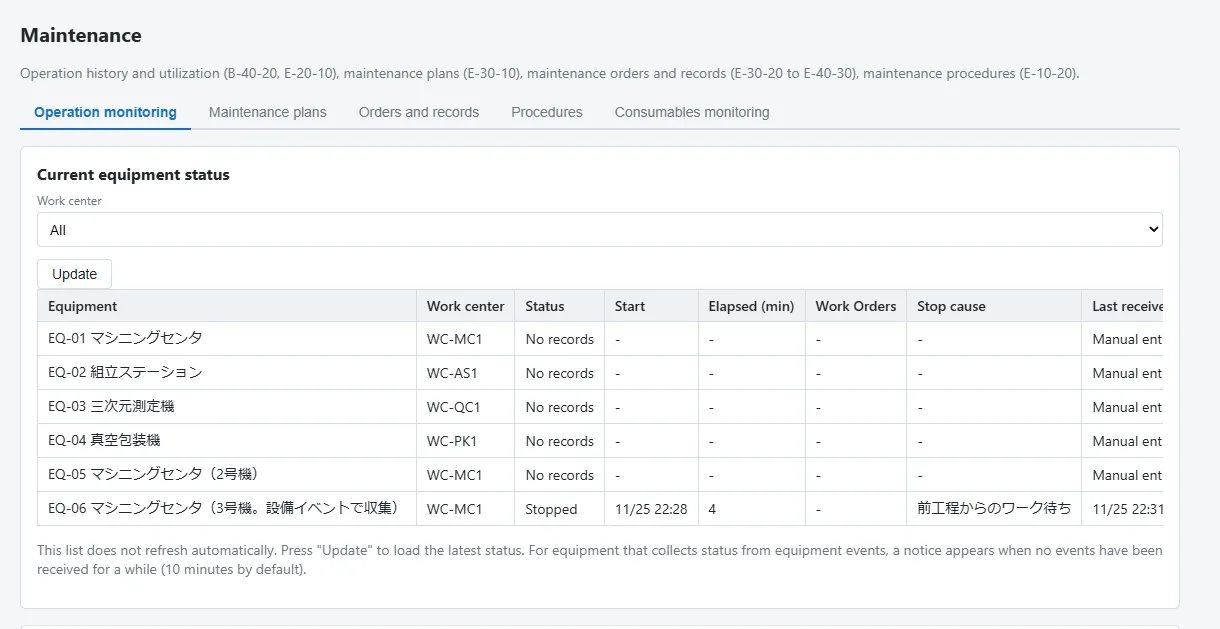
MaintenanceOperation monitoring
Operation monitoring tab of the Maintenance screen. In the current equipment status list, EQ-06, which collects status from equipment events, is stopped while waiting for work from the previous process

And more

Production plans vs. actuals

Register planned quantities per production date, product and process, and compare them with the good quantity of production results as an achievement rate.

Japanese and English

Switch the display language at the top right of the screen. The user guide is also available in both languages.

Works on phone widths

On narrow screens the menu opens and closes, and tables scroll sideways, so it can be used from tablets and phones on the shop floor.

Get it

All editions are free, with no license activation. The ZIP, Docker and Store editions do not need .NET installed.

Try on one PC

Microsoft Store

A Windows desktop edition that bundles the API, database and screens into one app. It needs no server and no network connection, so it suits trying out and evaluating the features.

Get it from Microsoft Store Windows 10 (2004 or later) / 11
Company server

ZIP

Extract it and run start.cmd (sh start.sh on Linux). It is self-contained, with the runtime included.

Download from Releases Windows / Linux (x64) · port 5000
Company server

Docker

Data stays in a volume. To run it together with PostgreSQL, use compose.postgres.yaml.

docker run -d -p 8080:8080 \
  -v mesapp-data:/data \
  ghcr.io/msmsrep/parallelfactorymes
amd64 / arm64 · port 8080

Try it out

  1. Start it

    Start one of the editions above and open http://localhost:5000 in a browser (8080 for Docker). The Store edition opens the app window directly. The database (SQLite) is created automatically.

  2. Create an administrator

    The first time, the initial setup screen appears; choose the user name and password and create the administrator. The Store edition works the same way.

  3. Load the samples

    Import the master data and actual records sample ZIPs in that order, and you are ready to try everything from manufacturing orders to shipping. The sample values, such as product names, are in Japanese.

How to use it

On a server on your company LAN

Put it on one machine with ZIP or Docker; PCs and tablets on the floor just open it in a browser. No installation or license activation on the devices. Use this setup for production.

Just trying it? One PC is enough For testing and evaluation

Other devices cannot connect to the Microsoft Store desktop edition. Use it to try out the features or to check procedures.

Server
Windows / Linux (x64), or Docker (amd64 / arm64)
Database
SQLite (default, nothing extra to install) / PostgreSQL / SQL Server
HTTPS
Terminated at a reverse proxy such as IIS / nginx (certificates from an internal CA or mkcert are fine)
Devices
A browser such as Chrome / Edge
Architecture
ASP.NET Core Web API + Blazor WebAssembly (.NET 10 SDK to run from source)