Sample walkthrough: from production to shipping
Using the sample master data and actuals (samples/), this page follows, with diagrams and screenshots, the whole flow from receiving components to making and shipping 10 gear pumps. The detailed operation of each screen is explained on the pages linked at the end of each section.
To get a feel for the flow in motion first, see Factory model: from production to shipping. This page is its detailed companion.
You can reproduce everything on this page yourself.
Put the CSVs in samples/master-csv and samples/actual-csv into one ZIP each,
and import the master data and then the actuals with Bulk import via ZIP at the top of the screen.
Operations not included in the CSVs (completion approval, inspection approval and so on) are listed in the last section.
The sample data values (product names, people's names, customers and so on) are in Japanese, so they appear in Japanese in the screenshots. This page gives them in English, together with their codes.
1. The overall flow
The subject followed here is manufacturing order SMP-FG-001, which makes 10 FG-1000 gear pumps. The housing, the outer part of the gear pump, is made by the upstream manufacturing order SMP-SF-001, which machines a casting and gives it a surface treatment.
From receiving components to shipping, there are the following 10 stages. The roles in charge are separated into horizontal bands (lanes) in the diagram.
| # | Stage | Screen used | Example on this page |
|---|---|---|---|
| 1 | Receiving | Logistics & Inventory → Receiving | 50 castings in lot R3001-260901 |
| 2–3 | Manufacturing order and release to processes | Production & Execution → Manufacturing Orders | SMP-FG-001 (10 units) → 3 work orders |
| 4 | Dispatching | Production & Execution → Dispatching | Assigning a worker and equipment to the work orders of SMP-FG-002 |
| 5–6 | Setup and recording results | Work Orders → Setup / Record Results | 10 units assembled; 9 good and 1 defective at packing |
| 7 | Completion approval | Record Results (Approve Production Completion) | The 3 work orders become “Approved” |
| 8 | Inspection | Quality → Inspections | Final inspection: flow rate 20.3 L/min, pass |
| 9 | Shipment judgment | Quality → Shipment Judgments | Judged “Approved”, and the judgment approved |
| 10 | Shipping | Logistics & Inventory → Shipping | 5 units to the customer Sample Trading |
2. The factory and the people
The sample has one factory, Plant 1 (PL-1). It consists of four levels: factory → line → area → work center, and each piece of equipment, storage location and worker belongs to one of these levels.
| User | Role | Part on this page |
|---|---|---|
| pm001 | Production management | Registering, approving and releasing manufacturing orders, dispatching, completion approval |
| lg001 | Logistics | Receiving components, shipping orders and shipping |
| op001 / op003 | Operator | Machining the housing (op003 works the night shift). op001 also enters results for the final inspection of the gear pump |
| op002 | Operator | Assembling and packing the gear pump |
| qc001 | Quality control / quality assurance | Inspection, shipment judgment |
There are two shifts: day shift D (8:00–17:00) and night shift N (20:00–5:00 the next day), which crosses midnight. The shift of an actual is decided by its start time. For details, see Master data.
3. What is made, and how
The FG-1000 gear pump is assembled from the in-house machined housing SF-2000 and five purchased components. The parent–child relationships between products are called the MBOM (bill of materials), and the sequence of processes the routing.
- The O-ring has an alternate part. RM-3004 (NBR) is normally used, but RM-3007 (oil-resistant FKM) in the same alternate group
ORING-P20can be used instead. - Each process of the routing is linked to a work center, candidate equipment, tools, required skills, checklists and manufacturing conditions. For example, PR-10 uses the machining centers (EQ-01 / EQ-05), the end mill TL-01, the skill SK-01 “machining center operation” and the pre-start checklist CL-01.
- The good units of the final process (PR-50 packing for FG-1000) go into inventory as the product lot.
For how to register MBOMs and routings, see Products, MBOM & Routings in Master data.
4. Receiving components
In charge: Logistics (lg001) Screen: Logistics & Inventory → Receiving
Components delivered by suppliers are registered in the warehouse as lots. All later inventory, consumption and tracing are connected by this lot number.
- You may specify a lot number or leave it blank to have one assigned automatically. The sample specifies numbers for lots that are consumed later (
R3001-260901and so on). - Lots with an expiry date appear in the Expiry alerts of the inventory screen as the date approaches. Expired lots can be neither consumed nor shipped.
- The castings are checked by a receiving inspection (INS-03, visual). The inspection flow is explained in section 7.
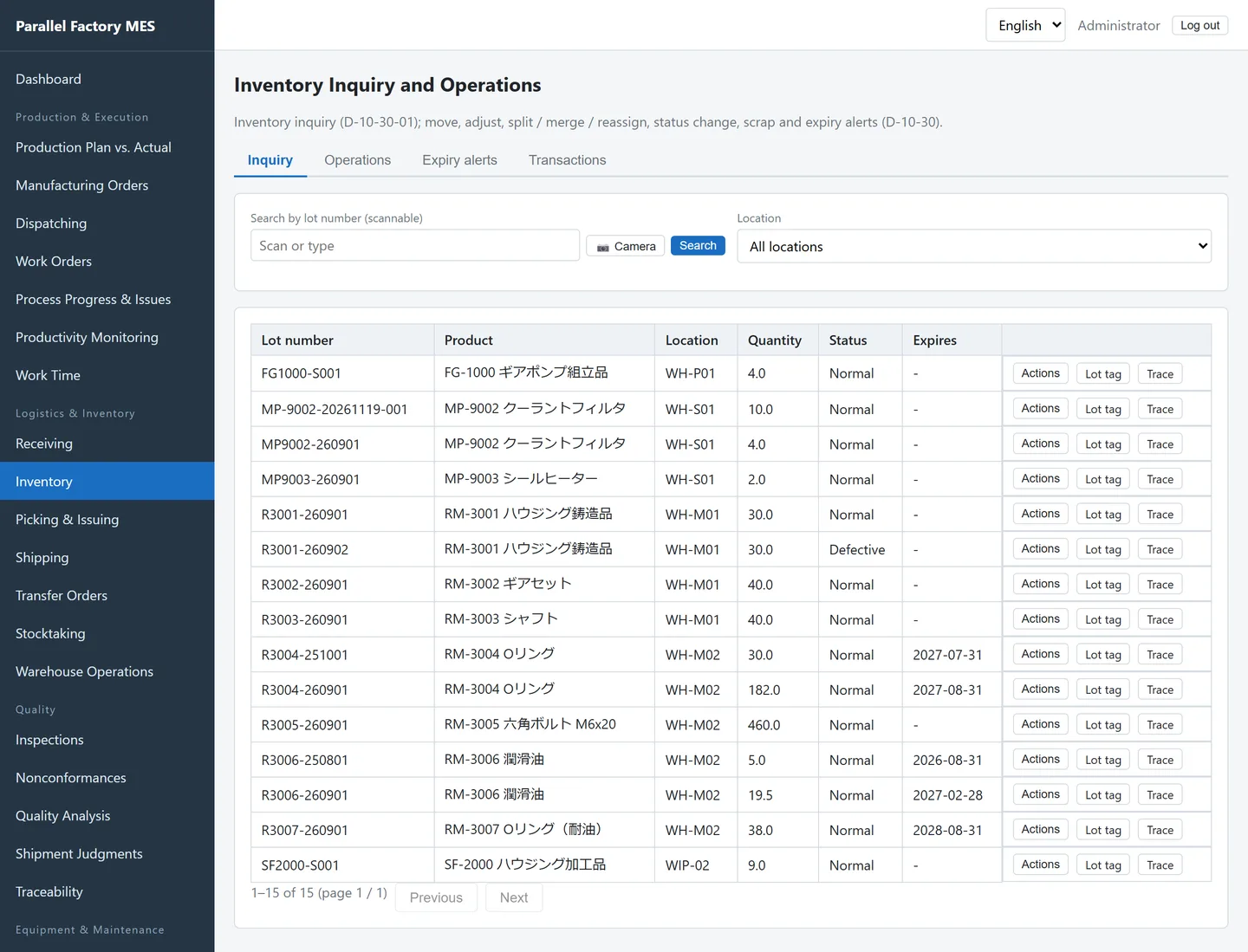
01–15 of the actuals CSVs and finishing shipping: 20 of the 50 castings in R3001-260901 have been used, leaving 30. Spare parts and an additional delivery received at the same time are also listed, and R3001-260902 shows "Defective" because it failed its receiving inspection. MP-9002, whose lot number was not specified, gets a number based on the day it was imported. If you import all the samples, the inventory operations from 16 onward change the quantities (for example, the castings become 31 after a return from issue, and the gear pumps 3 after retained samples)For details, see Receiving in Logistics and inventory.
5. From manufacturing order to work orders
In charge: Production management (pm001) Screen: Production & Execution → Manufacturing Orders / Dispatching
“What to make, how many, and by when” is registered as a manufacturing order. Once it is approved and released to processes, a work order is created for each process along the routing.
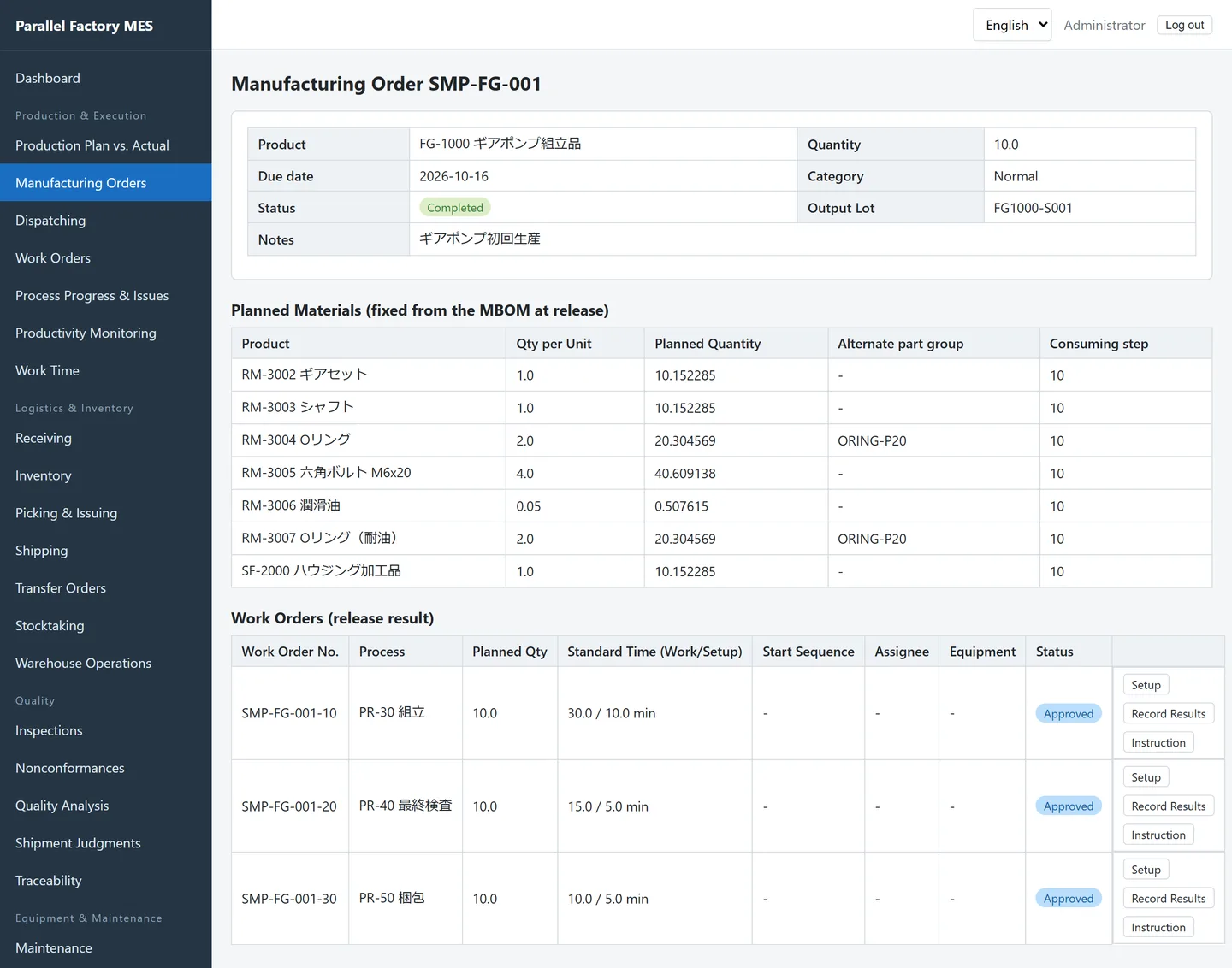
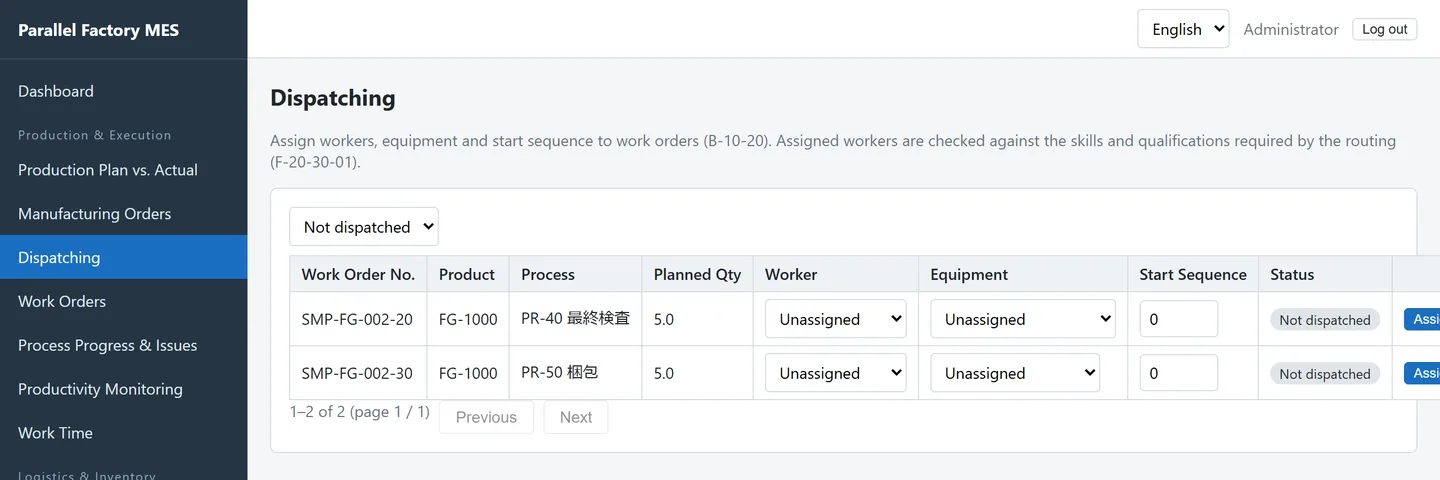
In dispatching, a worker, equipment and start sequence are assigned to each work order. The worker is checked against the skills required by the routing, and people without the skill, or whose qualification has expired, cannot be assigned (for example, PR-30 assembly requires the skill SK-04 “assembly work”).
For details, see Production management and Dispatching in Production execution.
6. Making it on the shop floor
In charge: Operators (op001–003) Screen: Work Orders → Setup / Record Results
Workers open a work order, do the setup and checks, start the work, and record the component lots used and the output. In the sample, the housings are machined on the night shift of 9/1, surface-treated by a subcontractor on 9/2, and the gear pumps assembled on the day shift of 9/3.
The following are recorded for one work order. All of them are entered on the result entry screen (work order list → Record Results).
| Record | Sample example | Meaning |
|---|---|---|
| Setup | Pre-setup of SMP-SF-001-10, 20:30–20:50 | The time taken for setup, and any abnormalities |
| Checklist | CL-01 pre-start check (removing chips is an optional item and left unchecked) | It cannot be registered while a required item is unchecked |
| Material consumption | 10 of SF2000-S001, 18 of R3004 and 2 of the alternate R3007 consumed in SMP-FG-001-10 | Which lots were used and how many. Products not in the planned materials cannot be consumed. Alternates require a reason |
| Process condition data | Tightening torque 10.2 N·m (in range), feed 1350 (out of range) | Checked automatically against the tolerances of the process control items |
| Output | At packing, good 9, defective 1 (DR-05), awaiting rework 1 | In the final process, the put-away location (WH-P01) is required |
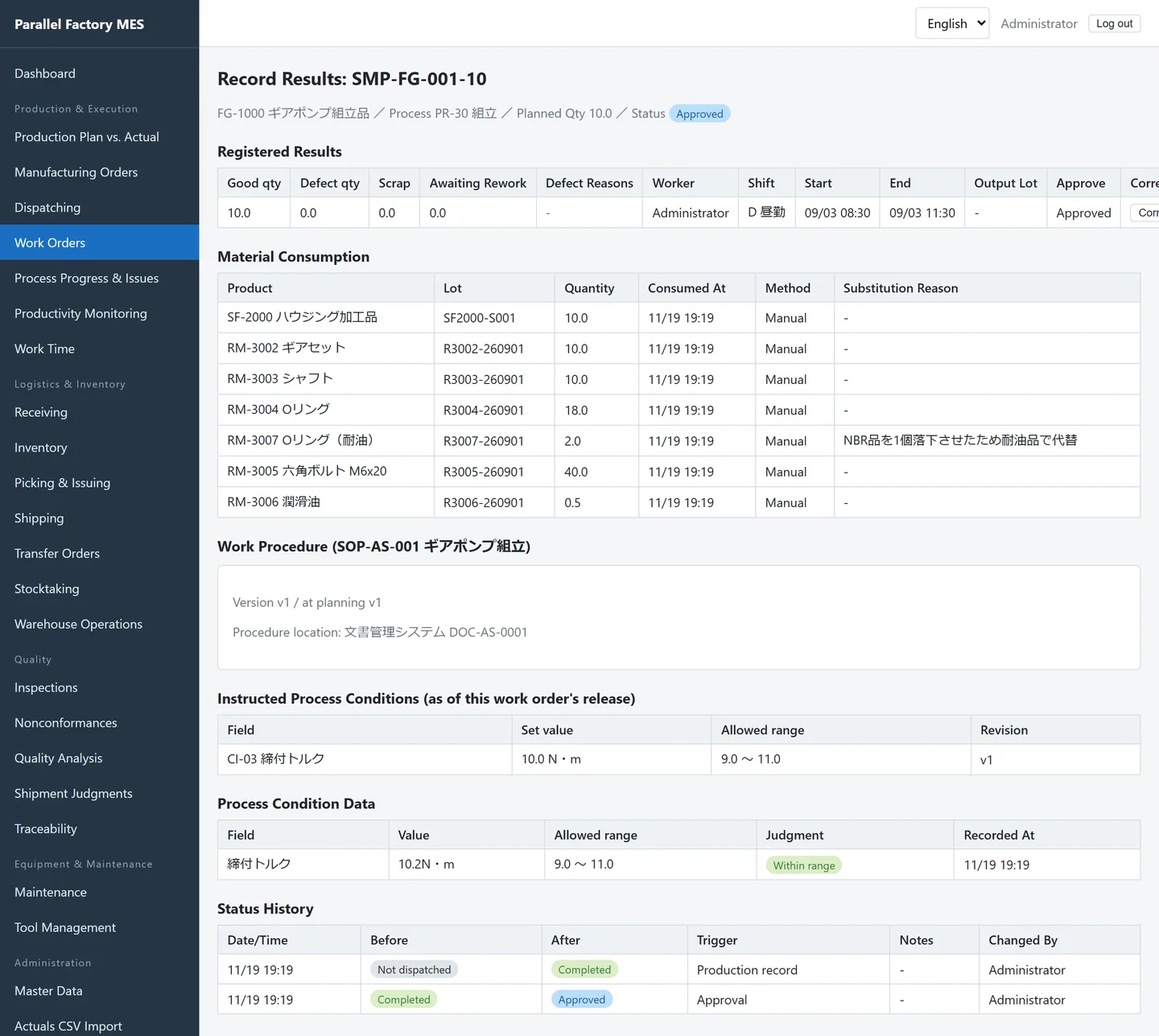
When a work order becomes “Completed”, production management (pm001) checks the results and presses Approve Production Completion. When all 3 have been approved, manufacturing order SMP-FG-001 becomes “Completed”.
Work time (direct and indirect work) and production trouble (a seal failure on the packing machine, safety of the walkway in the assembly area) are also recorded in the sample. For details, see Production execution.
7. Inspecting
In charge: Quality control (qc001) Screen: Quality → Inspections
When an inspection order is issued, the inspection items that match the inspection type, product and process are selected automatically, and the target lot becomes “Awaiting inspection”. Entering measured values checks them against the specification limits and decides pass or fail automatically; when every item is in, the overall judgment is made.
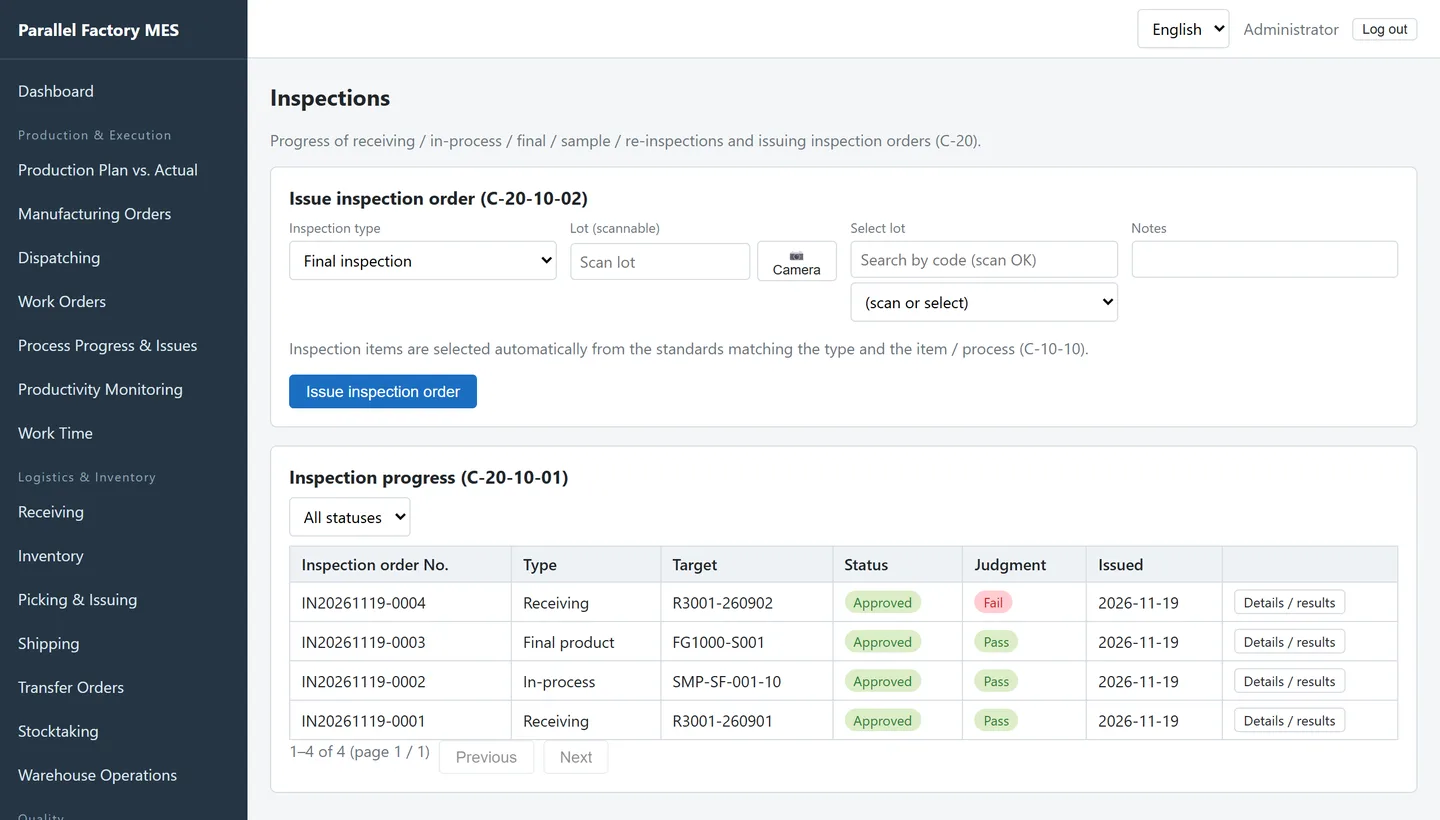
- In-process inspections target a work order (SMP-SF-001-10); receiving and final inspections target a lot.
- The measuring devices used (DV-01 caliper, DV-02 flow meter) are also recorded. Devices past their calibration date cannot be used for inspection (the sample has one device whose calibration has expired).
For details, see Quality control.
8. Shipment judgment and shipping
In charge: Logistics (lg001) and Quality assurance (qc001) Screen: Logistics & Inventory → Shipping / Quality → Shipment Judgments
A shipment can be carried out only when both the shipping order made by logistics and the shipment judgment given by quality assurance are in place.
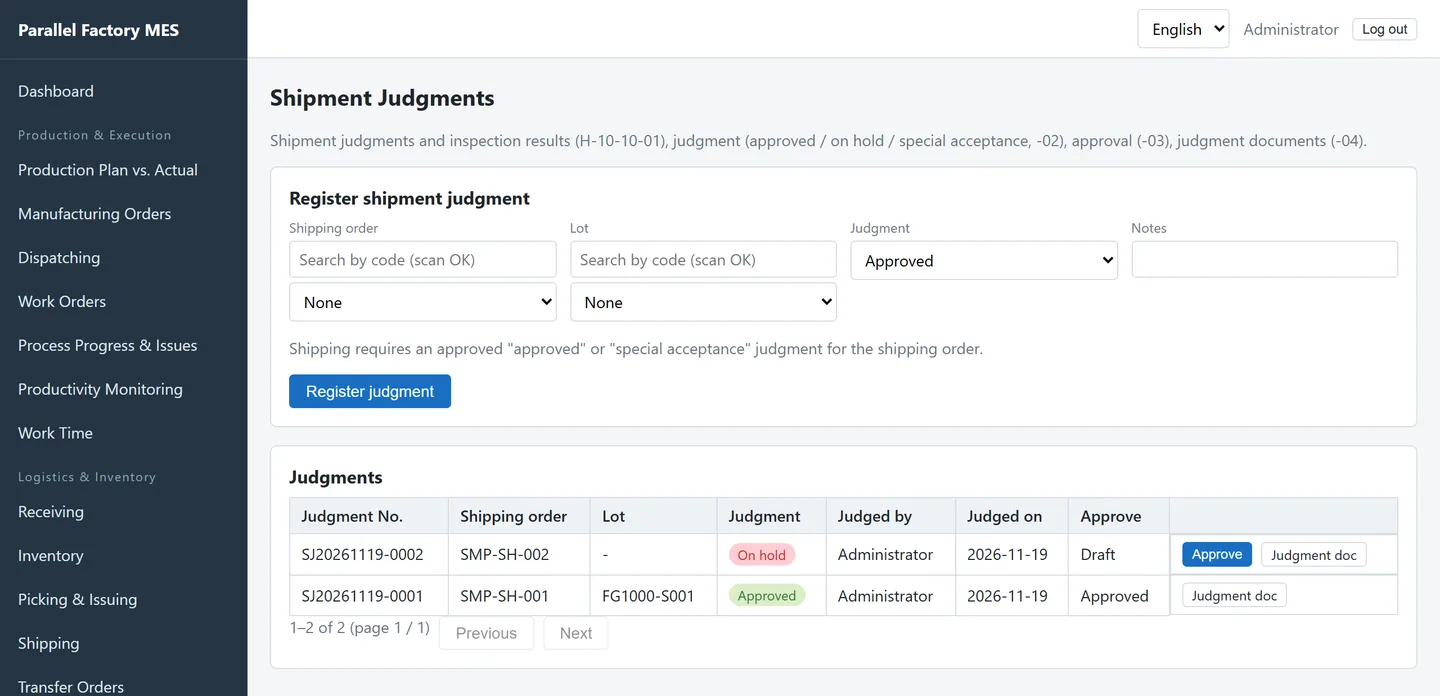
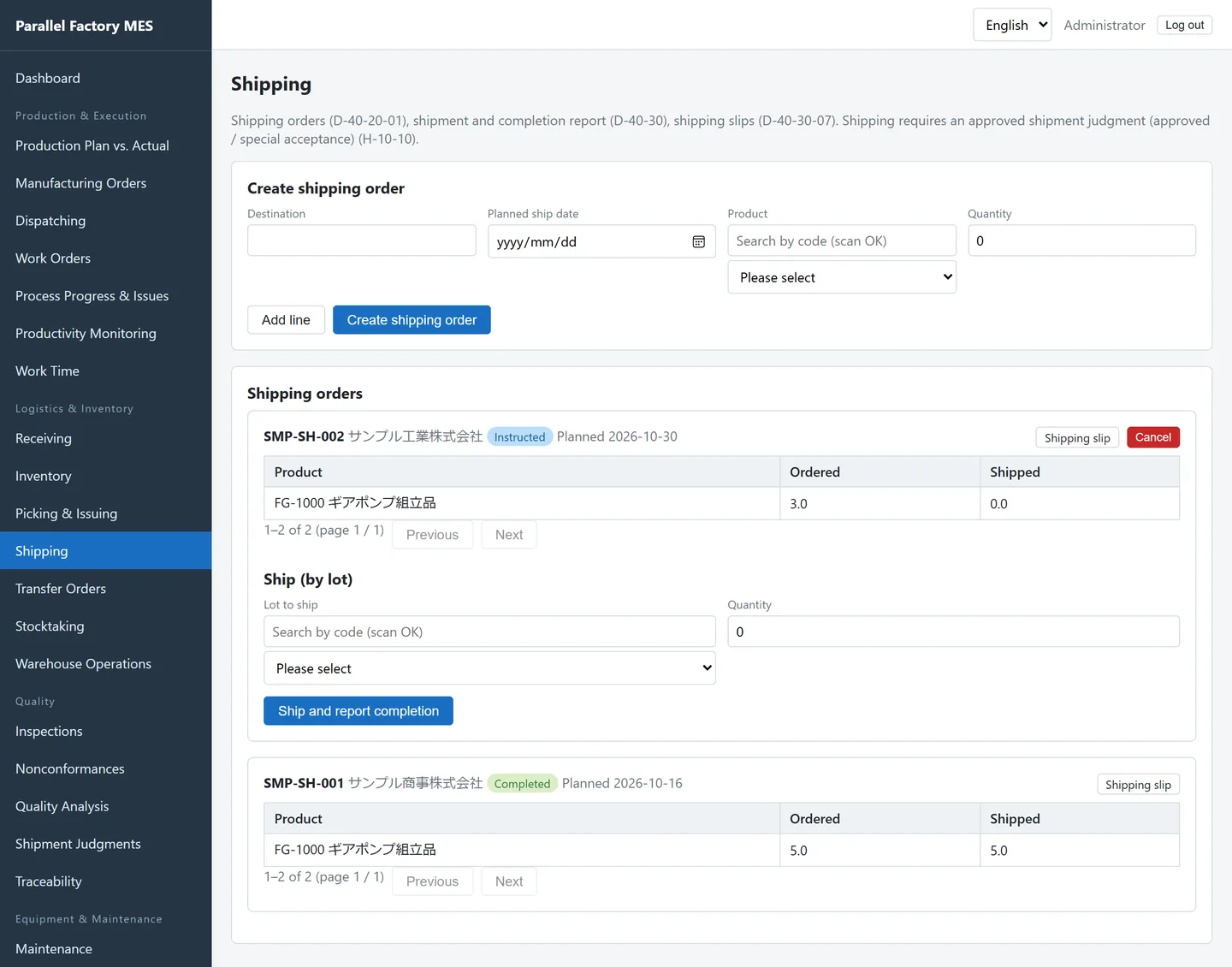
In the sample, the shipping orders, shipment judgments and shipments are also imported by CSV (13–15). The shipment number is SMP-SH-001 as specified in the CSV, but the judgment number depends on the day it is assigned, so it varies with the day of import.
For details, see Shipping in Logistics and inventory and Shipment judgments in Quality assurance.
9. Tracing afterwards
In charge: Quality assurance (qc001) Screen: Quality → Traceability
All records are connected by lot number, so from a product lot you can follow the components used, and from a component lot the products and shipments it went into.
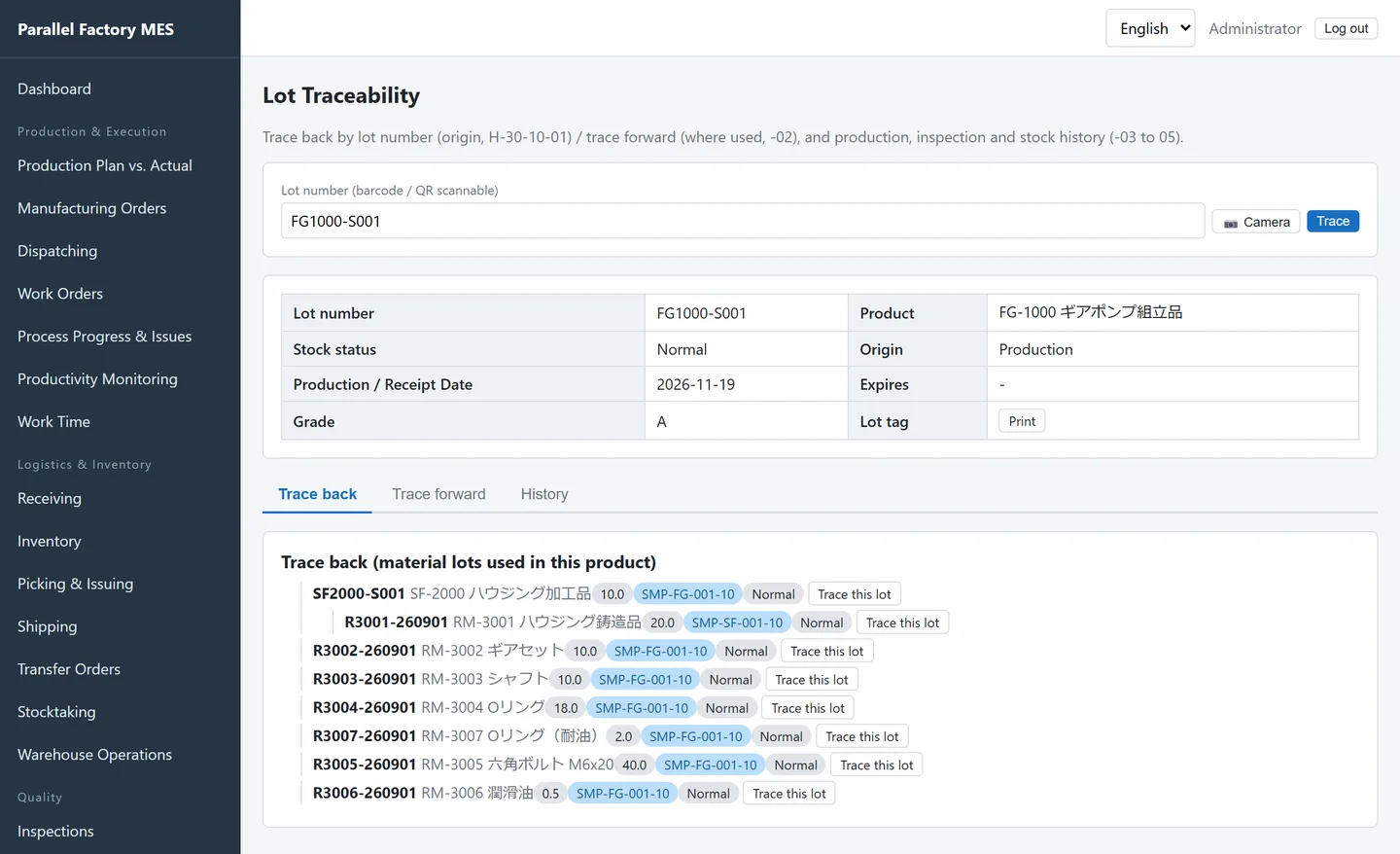
For example, if it turns out that “the castings in R3001-260901 have many voids”, the trace forward of R3001-260901 immediately shows that SF2000-S001 and the gear pump lot FG1000-S001 are affected. Opening the History tab of FG1000-S001 (production, inspection and inventory records) also confirms the 5 units shipped to the customer Sample Trading.
For details, see Traceability in Quality assurance.
10. Trying it yourself
The records imported by the sample CSVs, and those you operate from the screens, are as follows.
| Stage | Imported by the sample CSVs | Operations to do on the screens |
|---|---|---|
| Master data | The 20 files in samples/master-csv (work centers through users’ skills, maintenance procedures) |
― |
| Receiving | 01_receiving.csv (10 component lots and 3 spare part lots, including expired and soon-to-expire lots) |
Check the expired lots in the Expiry alerts of the inventory screen. If you increase the days to 365, the soon-to-expire lot also appears as expiring soon |
| Manufacturing orders | 02_manufacturing-orders.csv (SMP-SF-001 and SMP-FG-001 released, SMP-FG-002 approved, SMP-FG-003 draft), 17_manufacturing-orders.csv (rework order SMP-RW-001, approved) |
Release to processes and dispatching of SMP-FG-002 and SMP-RW-001 |
| Execution | 03–09 (setups, checks, consumption, output, process conditions), 16_equipment-logs.csv (equipment running, failures and stops) |
Approve Production Completion for each work order (pm001) |
| Inspection | 10_inspections.csv (4 inspections, up to judgment; the receiving inspection of the additional delivery fails) |
Approve inspection for each inspection |
| Shipping | 13–15 (2 shipping orders, shipment judgments, shipment; SMP-SH-001 is shipped, SMP-SH-002’s judgment is left on hold) |
Change the shipment judgment of SMP-SH-002 to “Approved”, approve it, and try shipping |
| Maintenance | 18–20 (3 maintenance plans, 2 spot requests and tool maintenance records; consumables are deducted from inventory). SMP-MT-003, issued from a plan, is left as instructed |
The maintenance record of SMP-MT-003, issuing orders from the remaining plans, and checking consumption in Consumables monitoring |
| Tools and calibration | 21–23 (TL-01 exceeds 80% of its life and gives a warning, TL-03 is issued and still in use, the expired DV-03 is calibrated) |
The life warning in Tool Management, and returning TL-03 |
| Inventory and logistics | 24–28 (split, move, adjust, status change, scrap, return, return from issue; 2 transfers, 2 pickings, 2 stocktakes; SMP-ST-001 is finalized) |
Carrying out the transfer and shipping picking left as instructed, entering counts and finalizing SMP-ST-002, and warehouse work progress |
| Nonconformances and samples | 29, 30 (the nonconformance raised by the failed receiving inspection, through scrap to approval; SMP-NC-001 with special acceptance instructed; 2 retained samples) |
Approving special acceptance of SMP-NC-001, and checking the retention period of the retained samples |
| Tracing | ― | Trace FG1000-S001 and R3001-260901 on Traceability |
About dates: The work times in the CSVs (9/1–9/3) are recorded as written in the files,
but receiving dates, production dates and the dates in assigned numbers become the day of import.
For the import rules, see samples/actual-csv/README.md.